Local-first Markdown notes

Desktop-class notes. Capture in one tap.

Igneous is a native notebook for iPhone, iPad and Mac. Your notes stay plain .md files in a folder you choose, and a new note is one tap away: from the Home Screen, the Lock Screen, Control Center or the Action button.

Coming soon to the App Store Mac download coming soon See it in motion
  • Plain .md files
  • No account
  • One app for iPhone and iPad
  • Mac app for macOS 14+
Igneous on a Mac: the notebook sidebar and a note called Writing in Markdown in live preview, with bold, highlight and inline maths rendered as you type.
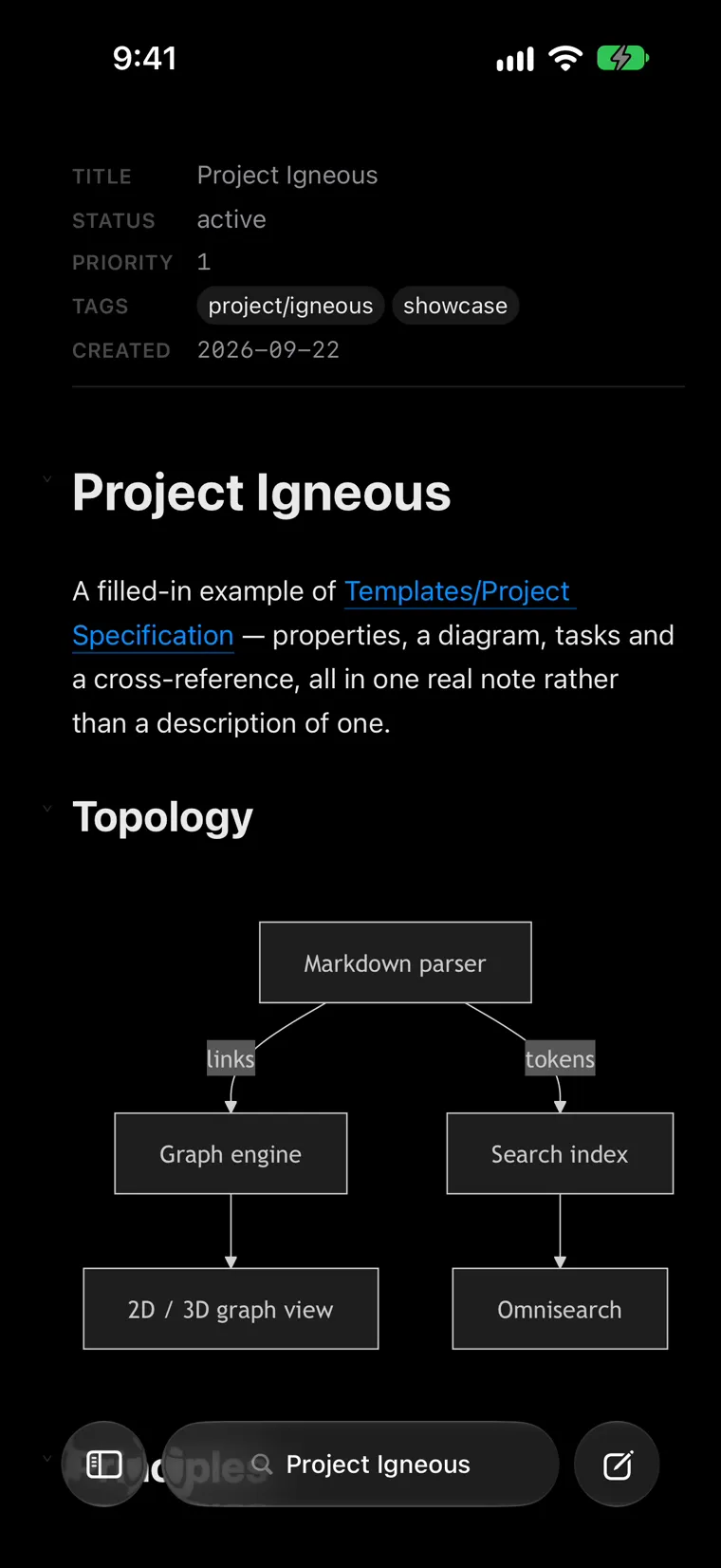
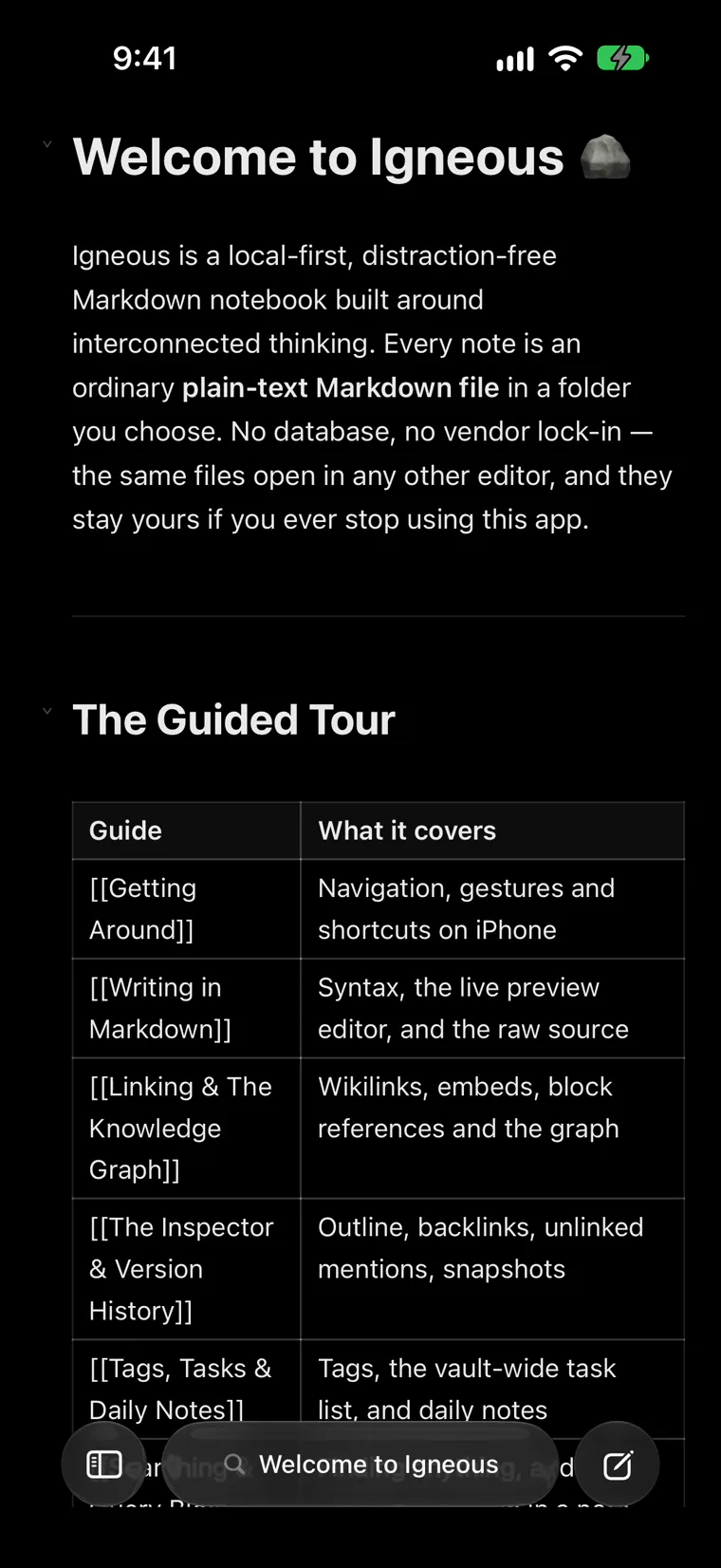
Igneous on iPhone: the Welcome note fills the screen, with the floating dock at the bottom. The recording swipes in the notebook drawer, opens a project note with a diagram, then opens the Tasks sheet.
.md
Plain Markdown files in a folder you choose. Nothing to export, ever.
0
Igneous servers, accounts, analytics or trackers.
3
Native apps: iPhone, iPad and Mac, from one codebase.
<10ms
to find a common word across 10,000 notes.*

Why

Why notes on a phone still feel broken

Four things get in the way of writing something down on a phone. Here's what Igneous does about each one.

  1. Waiting to write one sentence

    You open the app, find the list, press New, wait for a keyboard. The thought is half gone.

    IgneousCapture Note opens a blank note with the keyboard already up. When a launch comes from a capture button, Igneous holds the notebook scan and sync back for a second and a half, so the keyboard gets the first frames.

  2. Notes locked in an app's library

    When notes live inside an app's own storage, using them anywhere else means an export.

    IgneousEvery note is a .md file in a folder you choose: on the device, in iCloud Drive or Dropbox, or in a git repository through Working Copy. Other apps edit the same files.

  3. Needing a connection

    A spinner in a lift or on a train is the worst moment to lose an idea.

    IgneousIgneous itself never needs the internet. The editor is locked so it can't reach the network at all, and a notebook synced from your Mac is kept on the phone as a full offline copy.

  4. A graveyard of empty notes

    Every interrupted capture leaves another blank note behind.

    IgneousIf you capture a note and never type in it, Igneous deletes it when you leave it, or at the next launch. It only ever touches notes quick capture made, and you can switch it to Keep.

Features

A whole knowledge base, on the device in your hand.

Five things that make Igneous more than a quick-note app.

01 — Capture

Capture from anywhere

One tap to a blank note, wherever your hand already is. Each capture is its own note, filed in Inbox/ by default.

  • Control Center and the Lock Screen. Add the Capture Note and Today's Note controls.
  • The Action button. Assign Capture Note to it, or the New Note shortcut.
  • Widgets. Lock Screen widgets, and a Home Screen dashboard with recent notes and today's tasks. Tick a task off without opening the app.
  • Siri and Shortcuts. "New note in Igneous", or add a line to today's note without opening the app.
  • The Share sheet. Send a link, text, image or file from any app into your notebook.
  • On the Mac, a system-wide hotkey (Space by default) opens a fresh note from any app.

Controls for Control Center, the Lock Screen and the Action button need iOS 18. Everything else here works from iOS 17.

Illustration, not a screenshot
02 — iPhone

Everything under your thumb

There's no toolbar at the top. The note fills the screen, and everything else lives in one floating glass dock at the bottom.

  • Tap the title pill to search every note. Swipe it to move between open tabs, or keep going past the last one for a new tab.
  • Swipe up on the pill to see every open note as a grid of cards.
  • Swipe in from the left edge for the notebook drawer. The right edge opens the Inspector.
  • While you read, the dock folds into a slim pill just above the home indicator.
  • Liquid Glass on iOS 26. Turn on Reduce Transparency and it goes solid.
Igneous on iPhone: the Project Igneous note, with the title pill in the dock at the bottom. The recording swipes the pill to switch between two open notes, then swipes up to show both as cards in the tab grid.
03 — Apple Intelligence

Writing Tools that keep your Markdown

Rewrite, proofread or change the tone with Writing Tools, and your structure survives.

  • Writing Tools gets the real Markdown, not the styled text on screen, so it can see your links to begin with.
  • Anything a rewrite drops goes back in: a [[link]], a #tag, maths, a checkbox, a callout, a footnote.
  • If a rewrite can't be made faithful, Igneous doesn't apply it. Losing a link quietly is worse than a menu item doing nothing.

Needs Apple Intelligence: a supported device and language, and iOS 18 or macOS 15 or later. Writing Tools is Apple's feature and runs under Apple's privacy terms.

In your note
The [[Chiller Plant]] review moved to Friday. #mechanical
- [ ] Confirm the 350 kW load
What a rewrite might hand back
The Chiller Plant review has been rescheduled to Friday.
- [ ] Confirm the 350 kW load
↑ the link's brackets and #mechanical are gone
What Igneous saves
The [[Chiller Plant]] review has been rescheduled to Friday. #mechanical
- [ ] Confirm the 350 kW load
An illustration of the repair rule: a rewrite that dropped a wikilink's brackets and a tag has them put back before the note is saved.

Illustration of the repair rule

04 — Search

Find it by name, by word, or by meaning

⌘K on a Mac or iPad, or a tap on the pill on iPhone, opens Omnisearch over every note. Notes whose names match come first, then notes that just mention your words.

  • A query language when you want it: tag:, task:open, path:, and your own frontmatter, like priority<=2 or due>=today-7d, joined with AND, OR and NOT.
  • Query blocks. Fence a search as igneous in a note and it keeps its own answer up to date, as a LIST, TABLE or TASK list.
  • Search by meaning, on the device. A search for "chiller power capacity" can find notes about cooling and electrical loads that never use the word. It uses the language model already on your device and never downloads one. It only indexes while you're charging and have stopped typing. On the Mac, switch it on in Settings.
  • Handwriting search. Turn it on and printed handwriting in your canvases becomes searchable, recognised on the device.
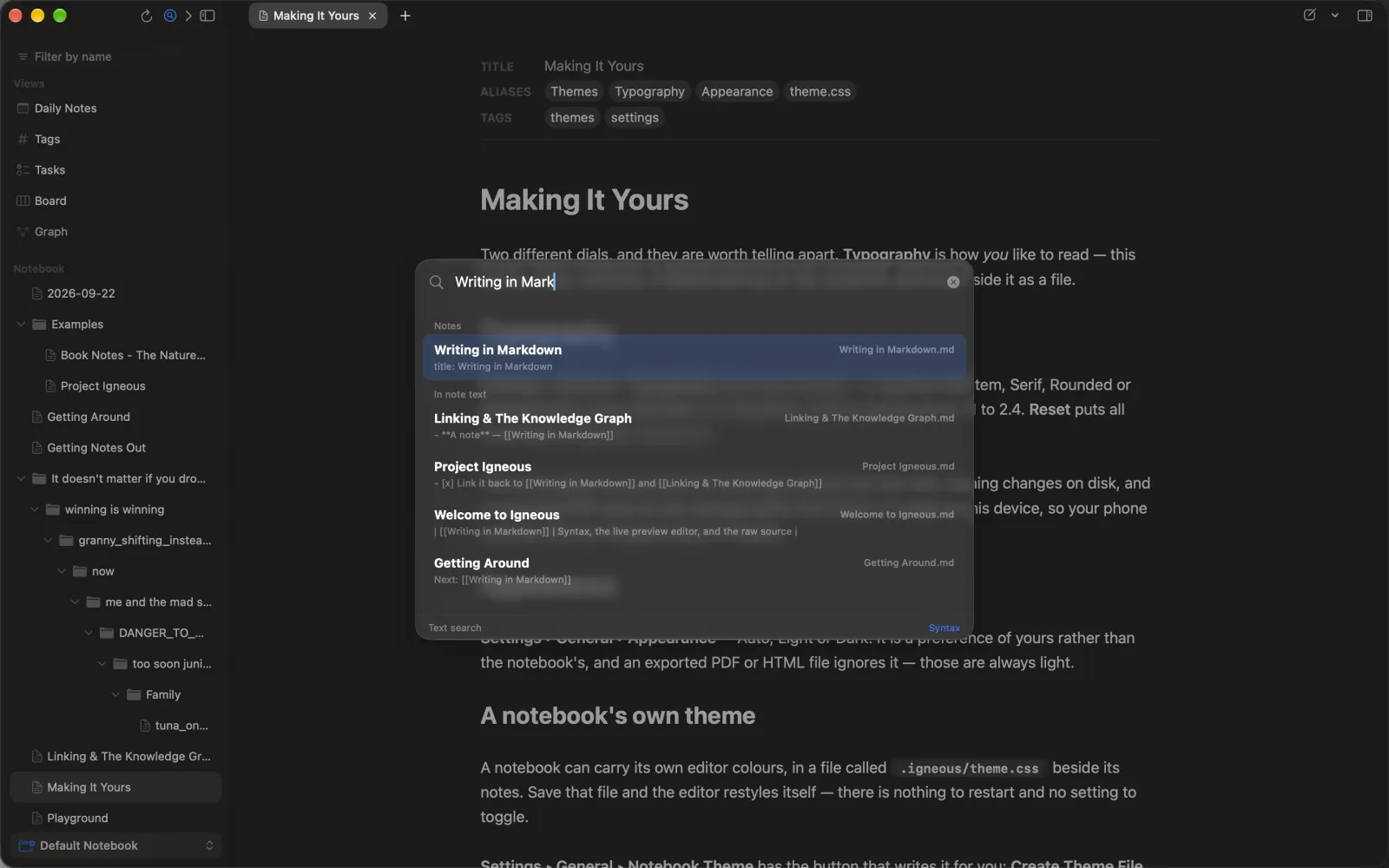
Omnisearch on the Mac: “Writing in Mark” typed into the search field, with matching note names listed above notes that mention the words in their text. The recording types, clears and searches again for “Book”.
05 — Your files

Your vault, as it is

Point Igneous at the folder you already keep. It reads Obsidian-compatible Markdown as written, and never adds anything you didn't type.

  • [[wikilinks]]
  • ![[embeds]]
  • block references
  • > [!callouts]
  • footnotes
  • frontmatter
  • ==highlights==
  • %%comments%%
  • Mermaid
  • KaTeX maths
  • .excalidraw.md drawings
  • JSON Canvas .canvas
  • Notes
    • Inbox
      • 2026-09-22 143207.md
    • assets
    • 2026-09-22.md
    • Chiller Plant.md
    • Site plan.excalidraw.md
    • Project map.canvas

Quick captures go in Inbox/, today's note is yyyy-MM-dd.md, and attachments go in assets/. All three are defaults you can change. Obsidian plugins don't run in Igneous, and it has its own query blocks rather than Dataview's.

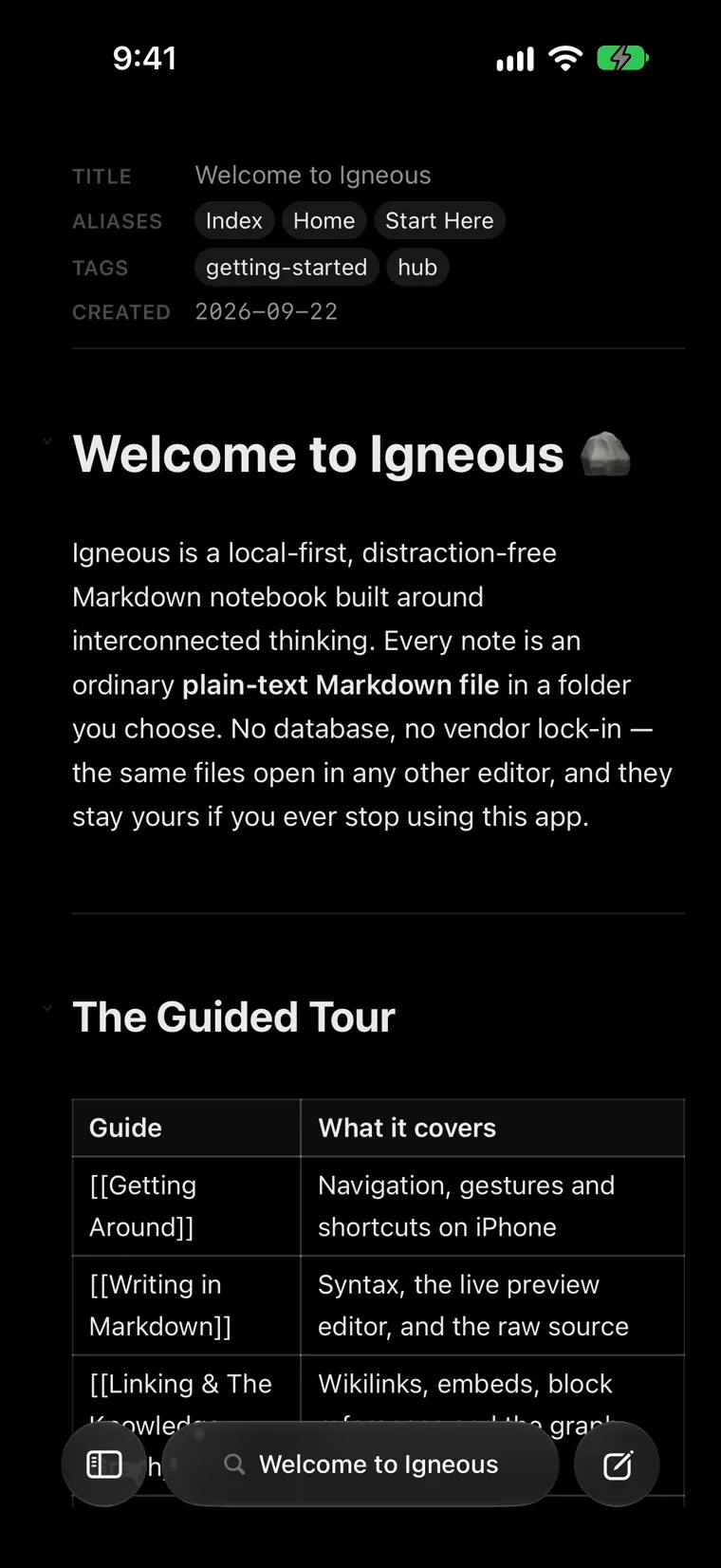
Igneous on iPhone: the Welcome note's frontmatter shown as properties (title, aliases, tags, created) above the note. It scrolls with the page, through a table of wikilinks and callouts.

iPad

Room to think.

A floating notebook pane, a real tab bar, and as many windows as Stage Manager will hold. Drag a note to the edge of the screen and it opens in a window of its own.

  • Apple Pencil. Scribble writes into any text field. Double-tap the Pencil to switch between Live Preview and source. Canvases take ink, cards and links side by side.
  • A hardware keyboard gets the Mac's shortcuts: ⌘K, ⌘T, ⌘E, ⌥⌘I, ⌃⌘D.
  • Split View and Slide Over. When the window gets narrow, Igneous folds down to the iPhone's layout, and springs back when there's room.
  • Filter the notebook as you type. Names that don't match fall away, and the folders around the ones that do stay open.
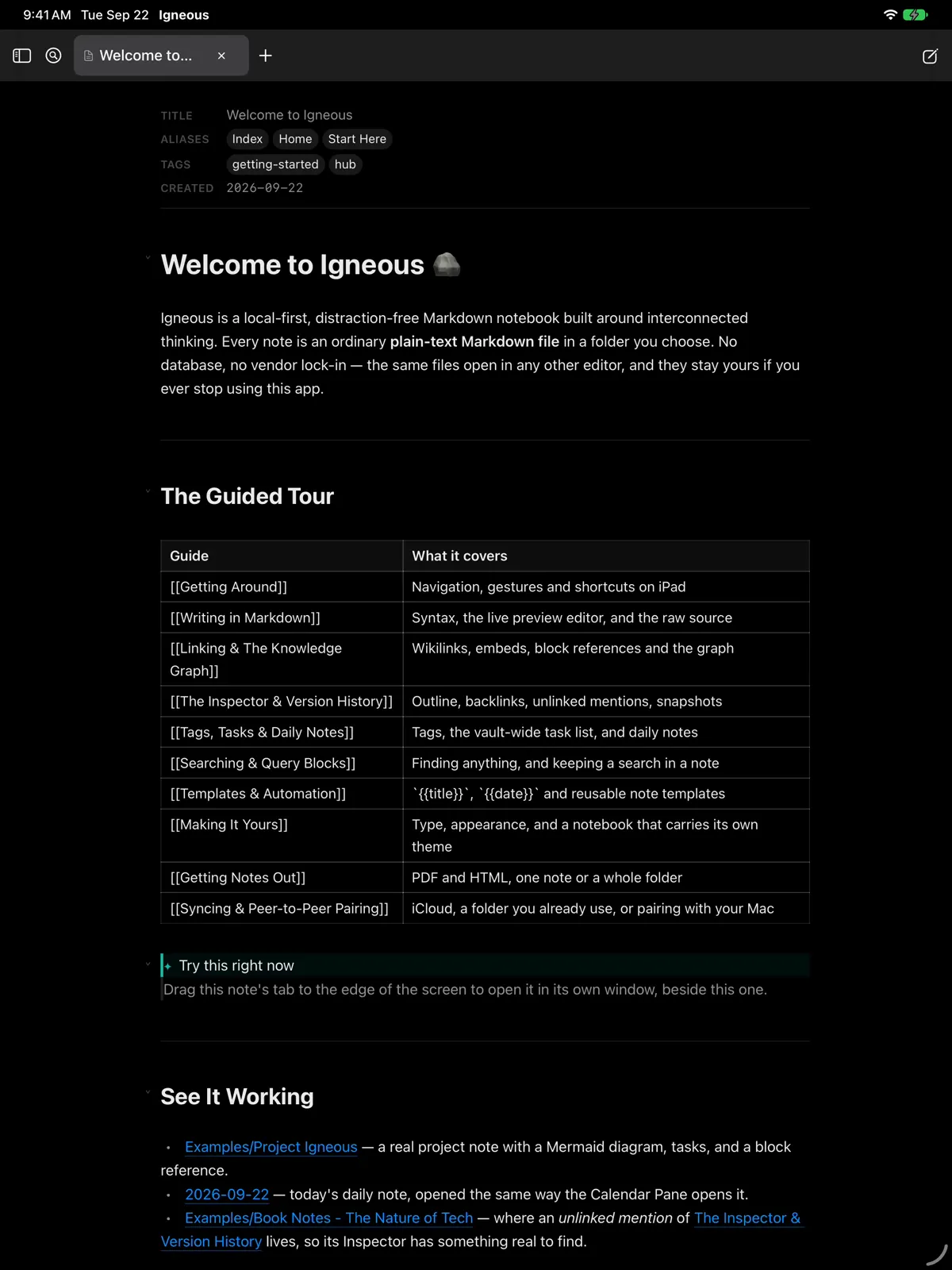
Igneous on iPad: the Welcome note in the live editor, with the tab bar across the top. The recording swipes the notebook pane in from the left edge, then scrolls to the end of the note.
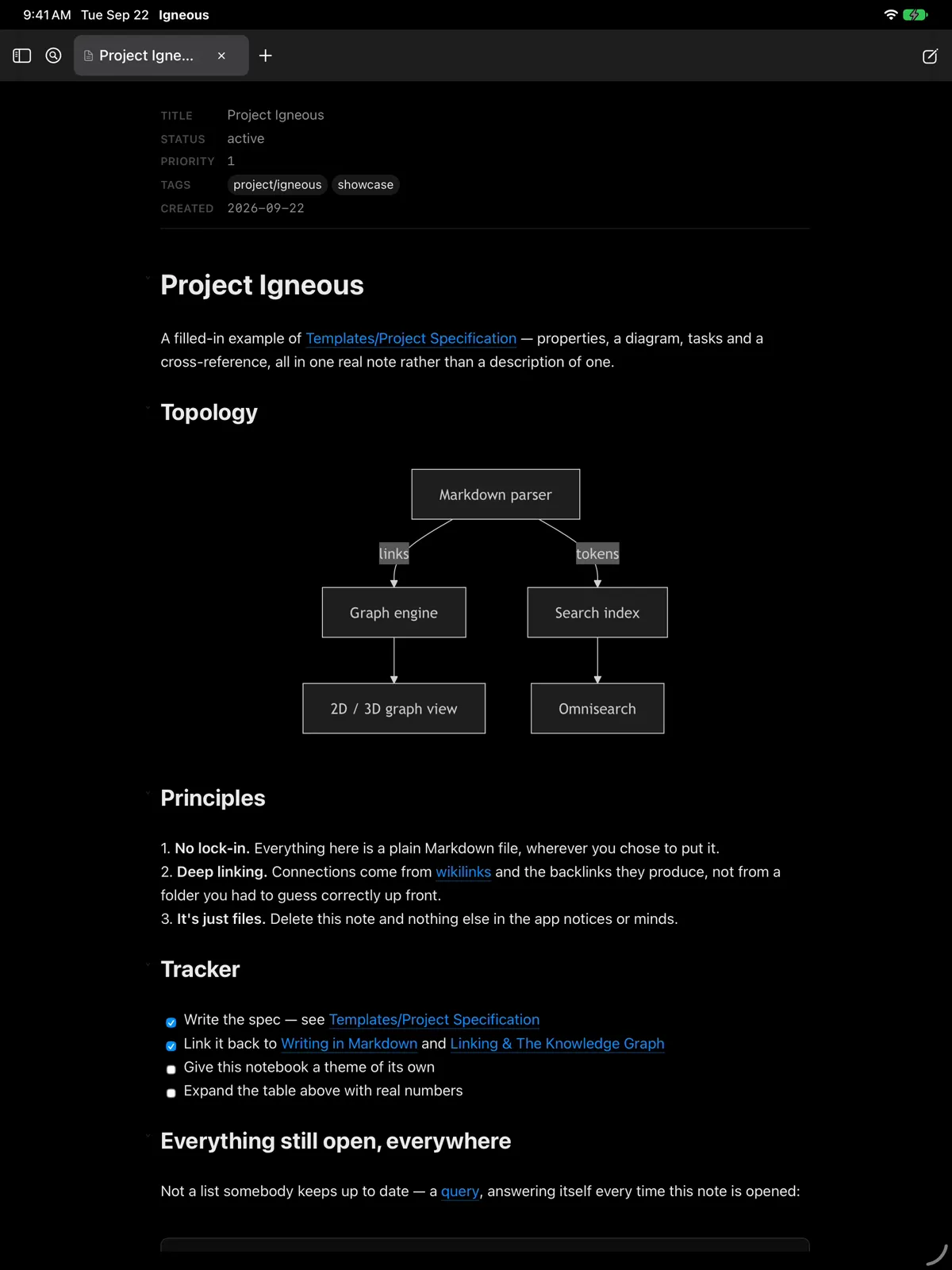
The Project Igneous note on iPad, opening on its Mermaid diagram. The recording scrolls through its principles and tracker, then opens Tasks and the graph from the notebook pane.
Diagrams, tasks and the graph
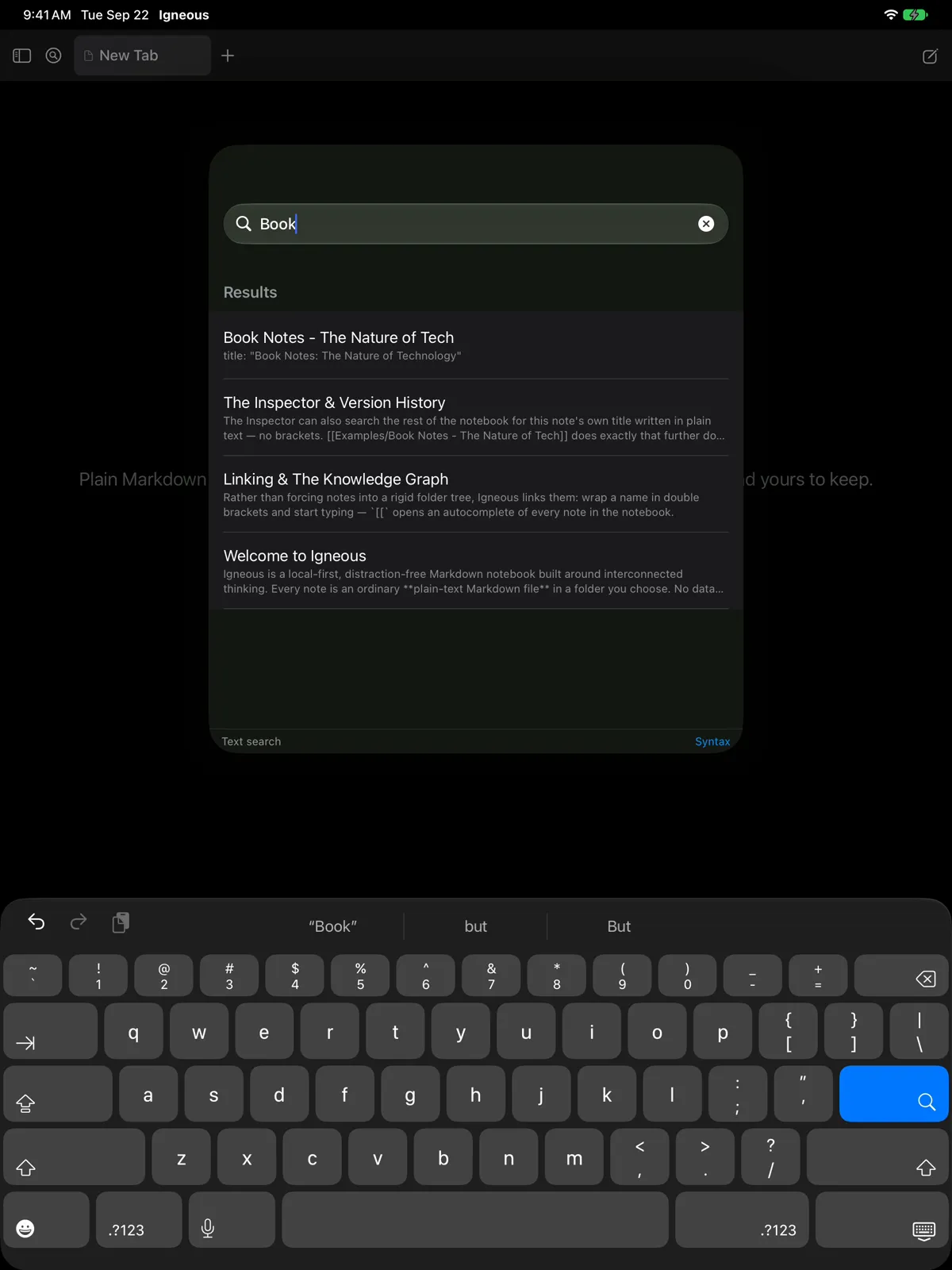
Omnisearch on iPad with “Book” typed: the matching notes listed, best match first. The recording types the query one letter at a time and opens the top result.
Search as you type
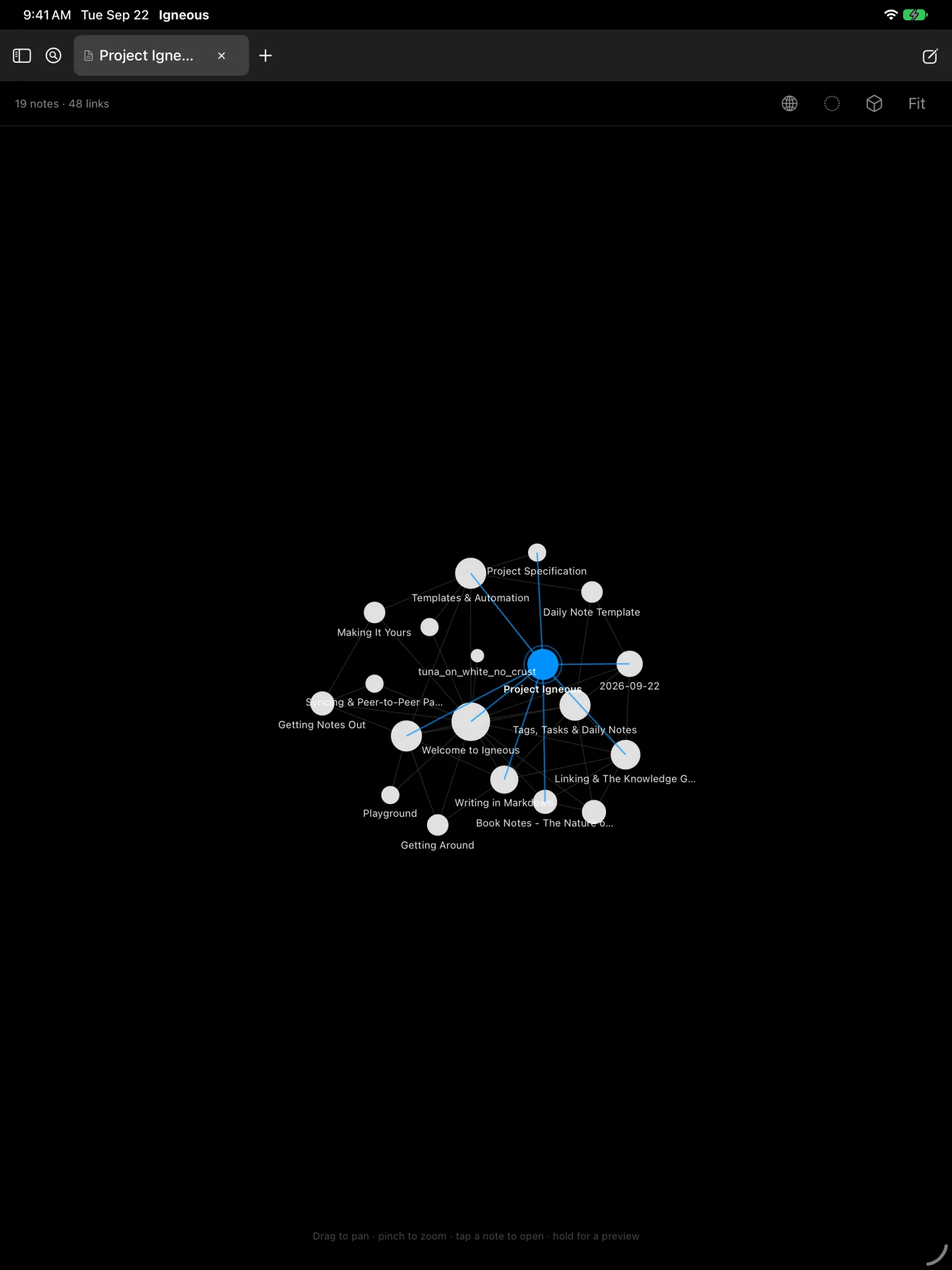
The graph view on iPad, centred on Project Igneous with its connections highlighted.
The graph

Mac

A real Mac app, not a companion.

The same notebook in native windows: tabs in the title bar that tear off into windows of their own, a graph column, and an Inspector beside the note.

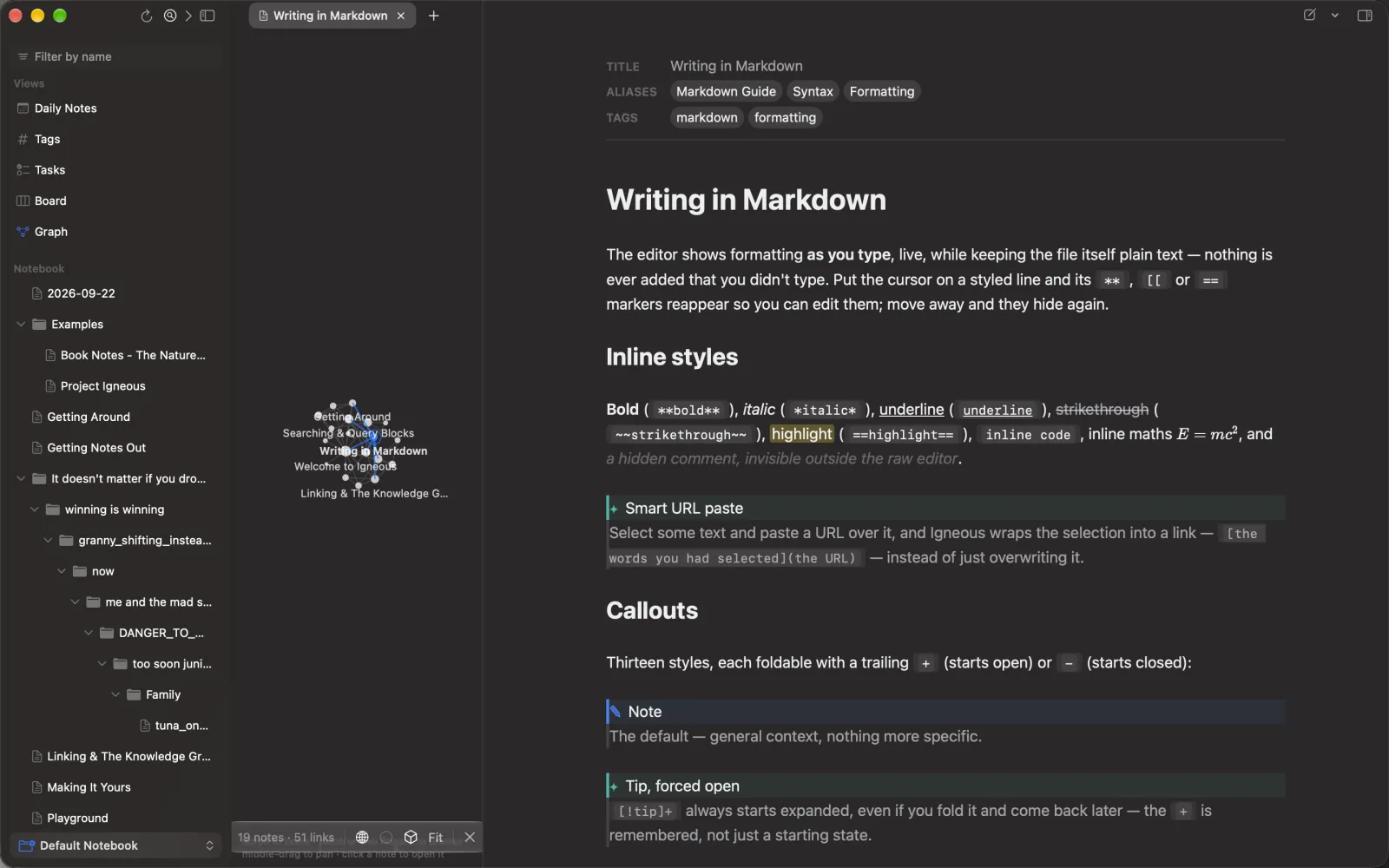
Igneous on a Mac: the note Writing in Markdown in live preview, with the graph column open beside it showing the neighbouring notes. The recording closes the graph, then opens the Inspector with the note's outline, backlinks and links.

Formatted as you write

Headings, bold, lists and links render as you type, and the Markdown comes back when the caret reaches it. ⌘E switches to the raw source. Edits made outside Igneous, in Obsidian, git or a shell, show up as they land.

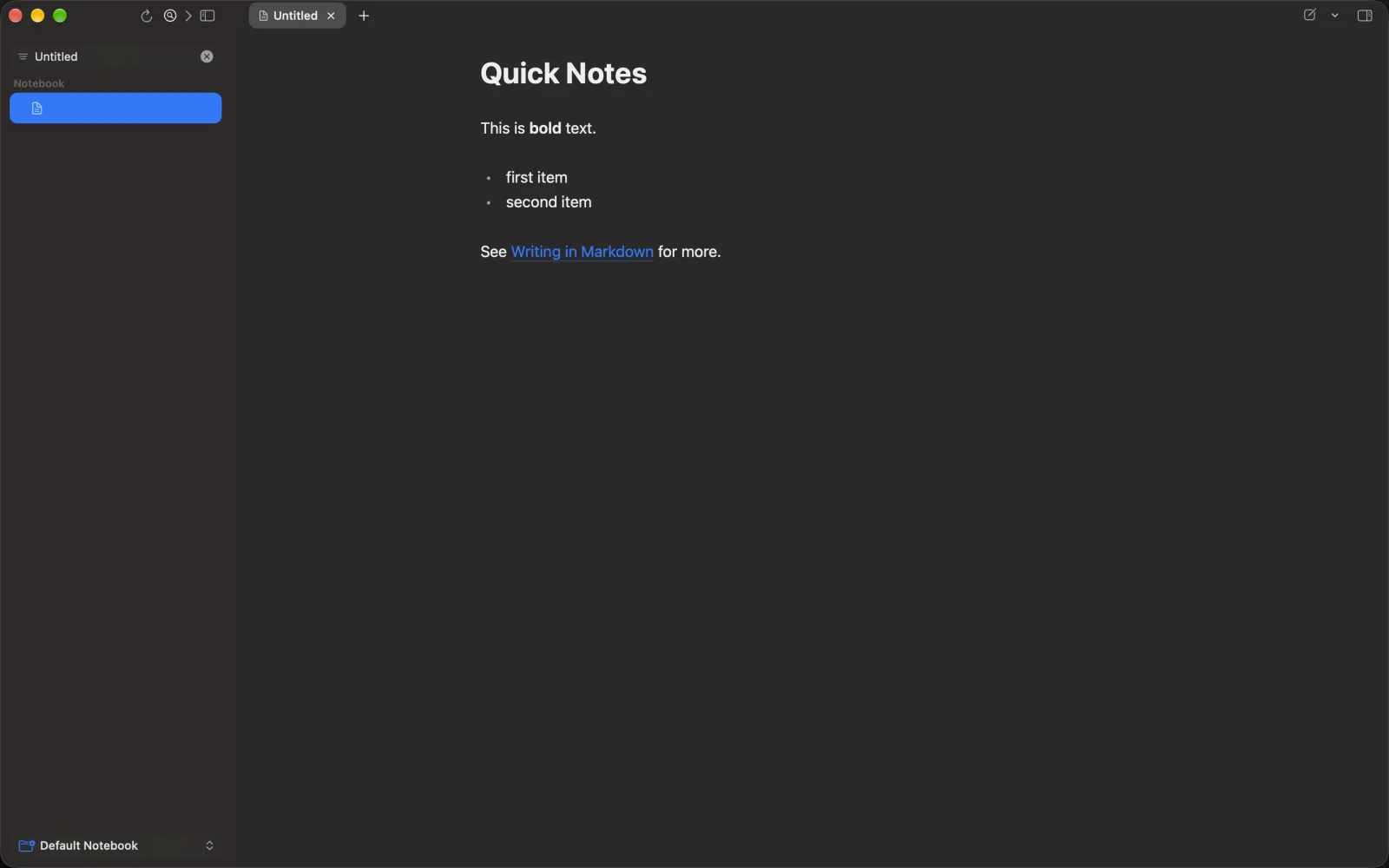
A note called Quick Notes in the Mac editor: a heading, a bold phrase, a two-item list and a link to Writing in Markdown, all rendered. The recording builds the note up line by line and it renders as each line lands.

The graph and the Inspector

A graph of the notes around this one, in 2D or orbital 3D. The Inspector shows the outline, backlinks with context, unlinked mentions, and version history you can restore from.

Find and replace across the notebook

⇧⌘F lists every hit before it writes anything, lets you untick the notes to leave alone, and saves each changed note to version history first.

Always a keystroke away

Keep Igneous in the menu bar, and open a new note from any app with a system-wide hotkey.

⌘K
Search every note
⌘P
Command palette
⌘E
Live preview ⇄ source
⇧⌘F
Find in notebook
⌥⌘I
Inspector
⌃⌘G
Graph
⌃⌘D
Today's note
⌥⌘T
Formatting bar
  • macOS 14 Sonoma or later
  • Apple silicon and Intel
  • A notarized direct download, not the Mac App Store

Sync

From your Mac to your phone, with no cloud in between.

Igneous on the Mac can serve your notebook over your own network. Your iPhone or iPad finds it with Bonjour, and you pair it once with an eight-character code.

  • No account and no server of ours. It's your Mac talking to your phone.
  • The phone keeps a full offline copy and catches up the next time you're both on the same network.
  • Edits merge. Changes to different lines are combined. If both sides changed the same lines, both versions are kept, side by side. Drawings and canvases merge shape by shape.
  • It's off until you turn it on, and every request needs the pairing code. The connection is plain HTTP inside your network, so use a network you trust.
  • Or skip it. Notes are files, so iCloud Drive, Dropbox or a git repository work too.
Sync inside your own network A Mac and an iPhone and iPad inside a dashed boundary labelled your network, joined directly. Outside the boundary, a crossed-out cloud: there is no Igneous server. YOUR NETWORK · BONJOUR · PAIRING CODE NO IGNEOUS SERVER Mac · serves the notebook iPhone, iPad · offline copy

Compare

Where your notes live matters.

Only facts you can check, stated plainly. No speed claims about anyone.

How Igneous, Obsidian, Apple Notes and Notion store notes, work offline and need an account
Question Igneous Obsidian Apple Notes Notion
Where notes live .md files in a folder you choose .md files in a folder you choose The Notes app's own library Your workspace, in Notion's cloud
Edit the same files in another Markdown app, no export Yes Yes No: import or export Markdown No: export needed
Works with no connection Yes Yes Yes Pages you've made available offline
Account needed to start No No No: an Apple Account only to sync with iCloud Yes

Competitor details are from each product's public documentation as of September 2026, and features change. Check them before you rely on this table.

Pricing

Pricing will be announced before launch.

Igneous isn't released yet, so there's nothing to buy. When there is, the price will be on this page, plainly. Whatever it turns out to be, your notes are plain files you can take anywhere.

  • No account
  • No ads
  • No tracking
  • Your files, in your folder

FAQ

Questions, answered plainly

Is Igneous available yet?

Not yet. The iPhone and iPad app will come from the App Store, and the Mac app will be a notarized direct download. The buttons on this page will change on the day each one is ready.

Does Igneous replace Obsidian?

It doesn't have to. Igneous opens the same folder and reads the same Markdown: wikilinks, embeds, callouts, frontmatter, Excalidraw drawings and canvases. It writes plain files back, so you can use both side by side. How quickly a note reaches your other devices depends on how you sync the folder.

Igneous also has its own full Mac app, if you'd like one app everywhere. Obsidian plugins don't run in Igneous.

What happens to my notes if I stop using Igneous?

Nothing. They're ordinary .md files and attachments in ordinary folders. Open them in Obsidian, VS Code, Finder, or any text editor on any system.

Are my notes sent to your servers?

No. There are no Igneous servers, accounts, analytics or trackers. Search by meaning and handwriting search run on your device. Sync goes directly between your own devices, or through a folder service you choose, like iCloud Drive.

Writing Tools and dictation are Apple's own system features, covered by Apple's privacy policy. The privacy policy has the details.

Which devices does it need?

An iPhone or iPad with iOS or iPadOS 17 or later. Controls for Control Center, the Lock Screen and the Action button need iOS 18. Writing Tools needs Apple Intelligence: iOS 18 or macOS 15 or later, on supported devices and languages.

The Mac app needs macOS 14 Sonoma or later, on Apple silicon or Intel.

Can I use the Action button?

Yes, on iPhones that have one. In Settings ▸ Action Button, choose Controls and pick Capture Note (iOS 18), or choose Shortcut and pick Igneous's New Note. Either way, a press opens a blank note with the keyboard up.

How much will it cost?

Pricing hasn't been announced. It will be on this page before launch.

Your notes are just files.
Keep them that way.

Igneous is coming to iPhone, iPad and Mac.

Coming soon to the App Store Mac download coming soon